

In options trading, speed isn’t just an advantage – it’s survival. A delayed chart, a missed OI shift, or an extra click to place an order can turn a winning setup into a costly mistake. When premium decays by the second and volatility spikes without warning, every moment spent navigating between tabs is a moment lost.
This is where most trading platforms fall short.
They scatter essential tools across multiple windows – charts in one tab, option chains in another, positions in a third. By the time you piece together the full picture, the market has already moved. For active options traders, this fragmentation is unfavourable.
Here’s where the Sahi trading app solves this problem. Its single-screen trading design keeps everything you need visible at once, eliminating the constant switching that slows down decisions and dulls your edge.
Why Options Trading Demands Single-Screen Focus
For options trading, you’re not just tracking price movement – you’re monitoring strike prices, OI changes, Greeks, premium decay, and expiry timelines, all at the same time.
Each of these actions requires opening a new tab or window. In fast-moving markets, this back-and-forth creates friction. You lose context, miss shifts in momentum, and hesitate when you should be acting.
Single-screen trading removes this lag entirely. Sahi keeps all critical information in one unified workspace, so your focus stays on the live market instead of the interface.
How Sahi’s Single-Screen Design Supports Faster Reactions
Here’s how Sahi’s setup translates into faster, sharper decision-making for options traders:
1. Dual chart view for Call and Put options
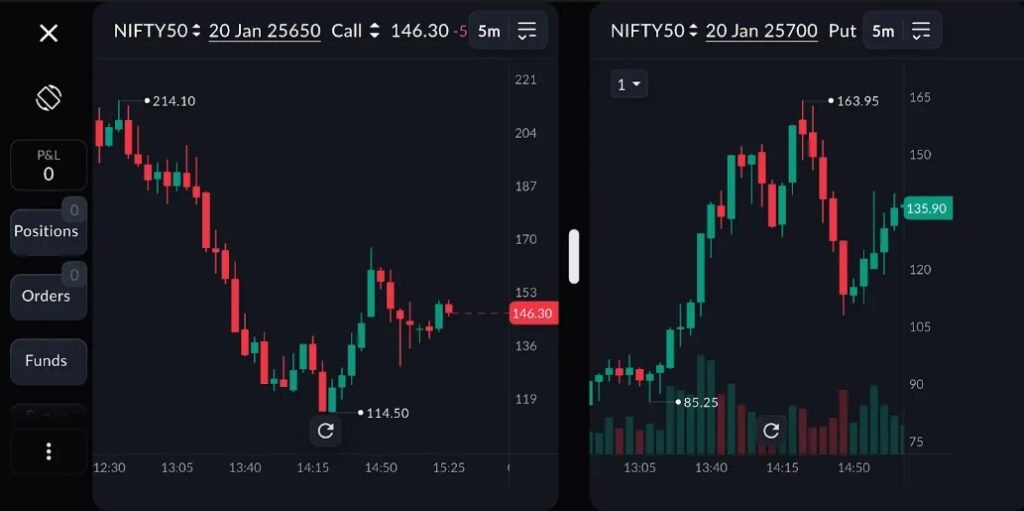
Sahi’s dual chart view
Active options traders don’t trade one leg in isolation. When you’re tracking momentum, you need to see both Call and Put charts simultaneously to confirm strength or weakness.
Sahi’s dual chart view places both charts side by side, fully synced in time and price movement. Premium shifts across both legs become visible at once. You can spot divergence, confirm breakouts, or identify when one side is showing unusual activity – all without switching screens.
This side-by-side visibility speeds up trade confirmation, especially during volatile sessions when every second counts.
2. Live option chain inside Scalper
In most platforms, the option chain lives in a separate tab. You check it, memorise the strikes, switch back to charts, and hope nothing changed in between.
Sahi places the live option chain directly inside the Scalper view, where you place trades. Strike-wise OI, OI change, Greeks, and expiry selection stay visible while you’re watching charts.
3. 1-tap exits directly from the chart
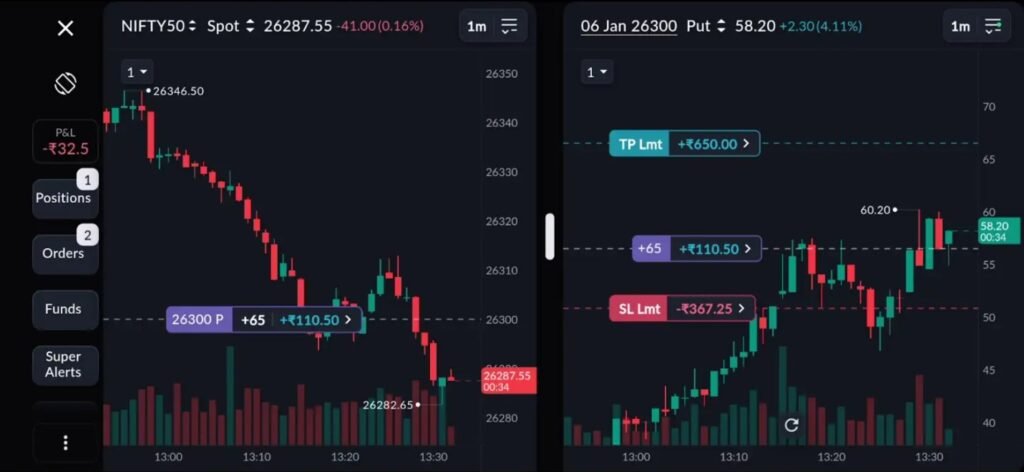
1-click chart exit for a seamless experience on the Sahi trading app
Sahi allows you to place exits straight from the chart with a single tap. You can exit at market or at limit.
Your exit logic stays connected to price action. You spot resistance, mark your level, and execute. The entire process happens in one fluid motion, keeping you aligned with market momentum.
4. Smart indicators for instant market context
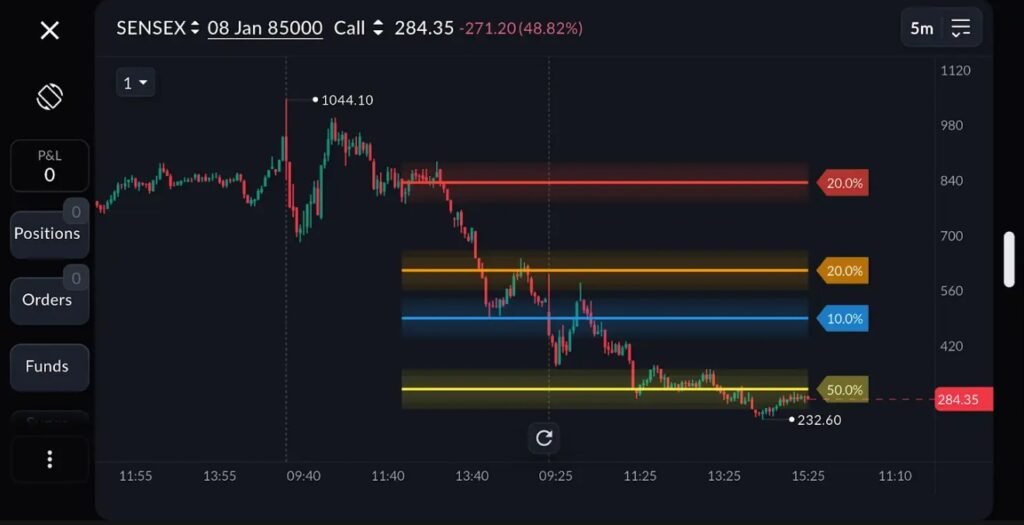
Sahi trading app’s smart indicators within the charts
Sahi’s smart indicators – Key Levels, OI Profile, and OI Support-Resistance – sit directly within charts. They update in real time and highlight zones where reactions are likely to occur. Instead of manually analysing support/resistance levels, OI data or switching to external tools, you get market context instantly, on the same screen.
This reduces mental load and speeds up pattern recognition, helping you identify market opportunities faster.
5. Sahi Pulse keeps trades visible at all times
Even with a single-screen setup, it’s easy to lose track of positions when you’re focused on charts. Sahi Pulse solves this by keeping your live chart and trade details visible in a picture-in-picture view, even when you switch to other apps or minimise the Sahi trading app.
P&L, stop-loss, target levels – everything stays visible without requiring you to toggle away from charts. You remain aware of your risk and exposure at all times, which helps prevent overtrading and keeps exits disciplined.
Why Single-Screen Trading Reduces Mental Load
Beyond speed, Sahi’s single-screen approach reduces cognitive strain. When you’re managing multiple positions across strikes and expiries, mental clarity becomes just as important as execution speed.
With everything on one screen, you don’t have to:
- Remember which tab holds which information
- Reconstruct context after switching windows
- Second-guess whether you missed something in another view
- Waste energy navigating the interface instead of reading the market
The Bottomline
Options trading rewards those who react fastest to market shifts. Sahi trading app’s single-screen design removes unnecessary friction from this process. Dual charts, live OI data, 1-tap exits, and integrated smart indicators create a workspace where decisions flow naturally from observation to execution.
When charts, data, and orders live on one screen, you spend less time navigating tools and more time trading with precision.
In addition, Sahi’s pricing is low and transparent – you get free brokerage for the first 30 days, ₹10 per executed order on F&O, and no annual maintenance charges.
To know more about Sahi and their products, visit www.sahi.com. You can also follow Sahi on X for all the latest updates.
The post How Sahi’s Single-Screen Trading Helps Options Traders Respond Faster to Market Shifts appeared first on Trade Brains Features.